 FREE EXTENSION
Chat2Word for ChatGPT
Export directly beside your ChatGPT answers. Save one response or create a batch ZIP with a separate document for every answer.
 Chat2Word
Export ChatGPT and Gemini answers right where you work. Save a single answer or turn a conversation into a ZIP of separate documents.
Install either edition—or both. Use the same Chat2Word email account and sign in separately in each extension. No API key or share link required.
FREE EXTENSIONExport directly beside your ChatGPT answers. Save one response or create a batch ZIP with a separate document for every answer.
 FREE EXTENSION
Export directly beside your Gemini answers. Save one response or create a batch ZIP with a separate document for every answer.
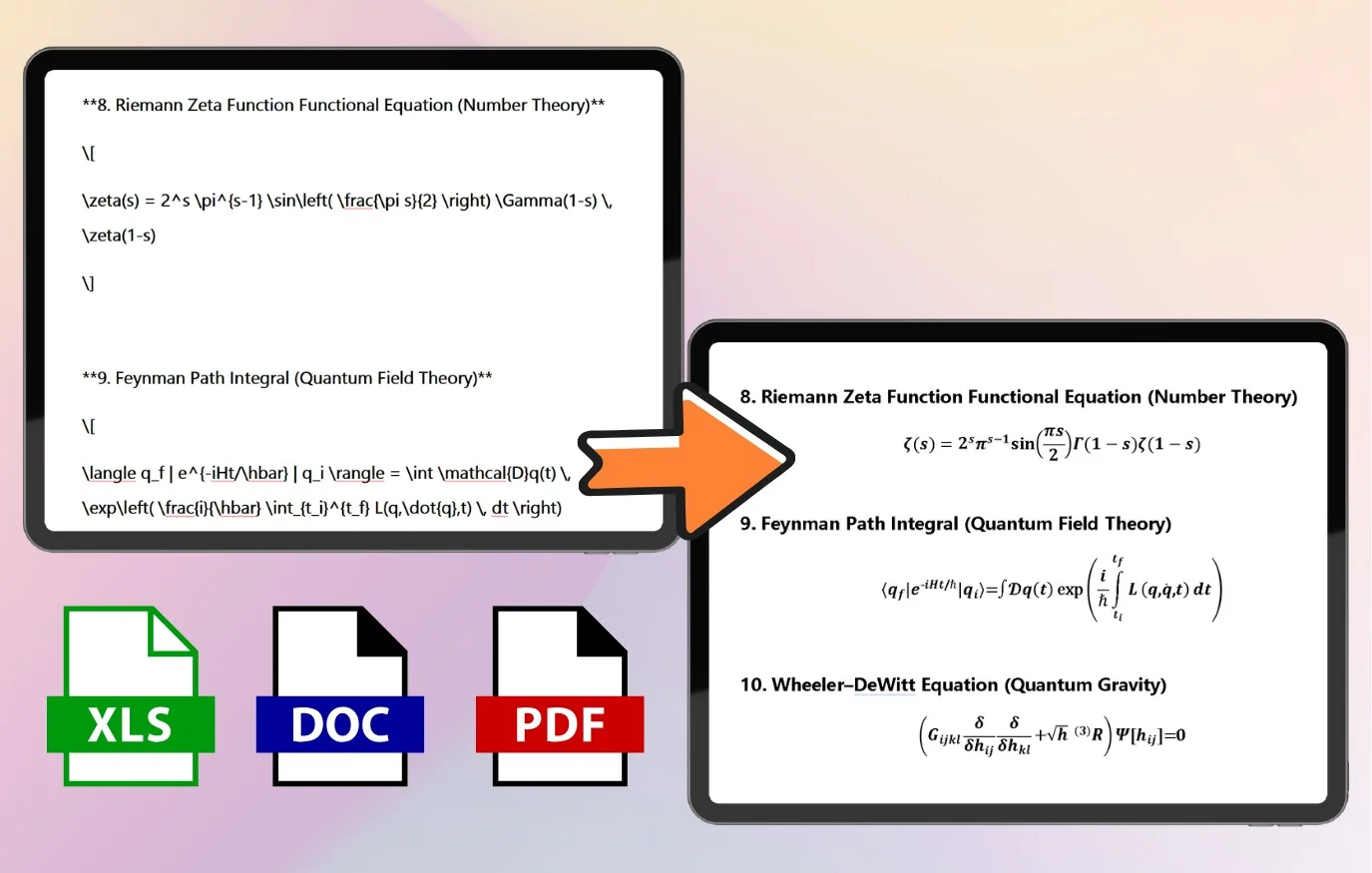
Choose Word, PDF or Markdown from the buttons next to an AI answer. Work with headings, tables, code and mathematical formulas.
Each AI answer gets its own Word and Markdown file, plus one JSON file for the export. Keep files ordered with four naming rules.
Track uploaded tasks in the sidebar. Download the completed ZIP or optionally receive it by email. Server processing continues after submission.
The online converter needs no account. Export simple content up to 10,000 characters to Word or PDF, or save Markdown locally.
Chat2Word has separate tools. Their formats, account requirements and processing limits are not interchangeable.
| Workflow | Output | Account | Best suited to |
|---|---|---|---|
| Online converter | Word, PDF; local Markdown download | No login | Simple pasted content. Word/PDF: up to 10,000 characters, no LaTeX or Mermaid. |
| ChatGPT extension | Single Word, PDF or Markdown; batch ZIP with separate Word/Markdown files and one JSON file | Email-code sign-in; currently free | Exporting accessible answers directly from a ChatGPT conversation. |
| Gemini extension | Single Word, PDF or Markdown; batch ZIP with separate Word/Markdown files and one JSON file | Email-code sign-in; currently free | Exporting accessible answers directly from a Gemini conversation. |
| Desktop tools | Word/PDF and other app-specific formats | Check the relevant app | Pasted content, other AI platforms and app-specific diagram or repair workflows. |
For the extensions and online converter, Word/PDF and batch exports use cloud processing. Generated files are retained for download without automatic expiry. A local Markdown download does not send its document content for conversion. Desktop and iOS apps have their own processing details.
Read the processing and storage detailsPractical instructions and downloadable reference files, with the limits of each workflow made explicit.
Save one answer as an editable document, or use a batch ZIP for separate answers.
Read the Gemini Word guideUse the single-answer PDF button and learn what a batch ZIP contains.
Read the Gemini PDF guideUnderstand filenames, task status, optional email and the Word/Markdown/JSON ZIP structure.
Read the batch export guideCompare Markdown with downloadable Word files and inspect a real exported document before choosing a workflow.
Open the export examplesPrefer a dedicated workspace or work with other AI platforms? Explore our existing apps for pasted Markdown, diagrams and additional export formats.
A dedicated converter for Windows and iOS, with format repair and more output options.
Explore the converter →A floating Windows tool for keeping your export workflow close to your other apps.
Explore the sidebar →Yes. The current ChatGPT and Gemini extensions are free. Sign in with an email verification code; no paid membership or API key is required.
A ZIP with separate Word and Markdown documents for each collected AI answer, and one combined JSON file. User questions can supply filenames but are not exported as separate answer documents.
English, Spanish, Brazilian Portuguese, German, French, Japanese and Traditional Chinese.
For short, simple pasted content. Web Word/PDF conversion stops at 10,000 characters and does not accept LaTeX or Mermaid. Choose a matching extension for conversation exports, or desktop tools for other workflows. Markdown downloads happen locally.
Word/PDF and batch exports use cloud conversion. Export servers are in Shanghai, China. Local Markdown downloads do not send document content to the conversion service. See our Privacy Policy for details.
Formatting can vary with source structure, page changes and export format. Review formulas, tables, links and code before sharing or relying on a document.